Flat File Integration
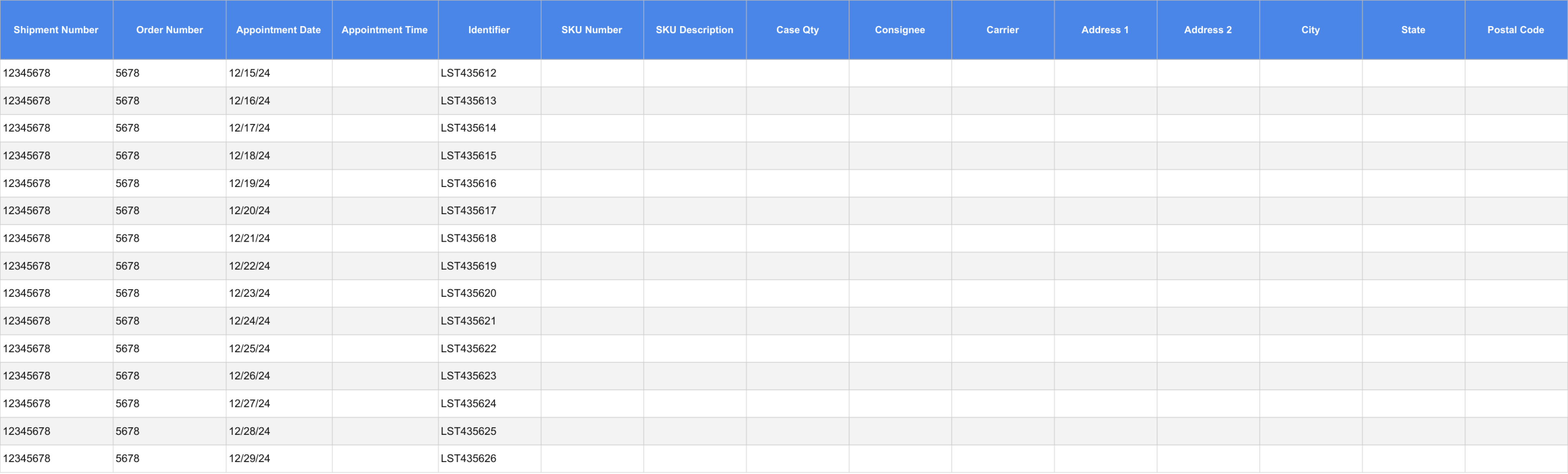
Kargo can ingest a flat file of expected shipments and automatically create scheduled shipments to validate. This is our quickest, simplest integration path. We can accept files via email, Secure File Transfer Protocol (SFTP), or AS2.
Once the file is processed, Kargo will update the database for the Shipments and Orders with the desired information, and we will create a scheduled shipment on the customer dashboard(example below)
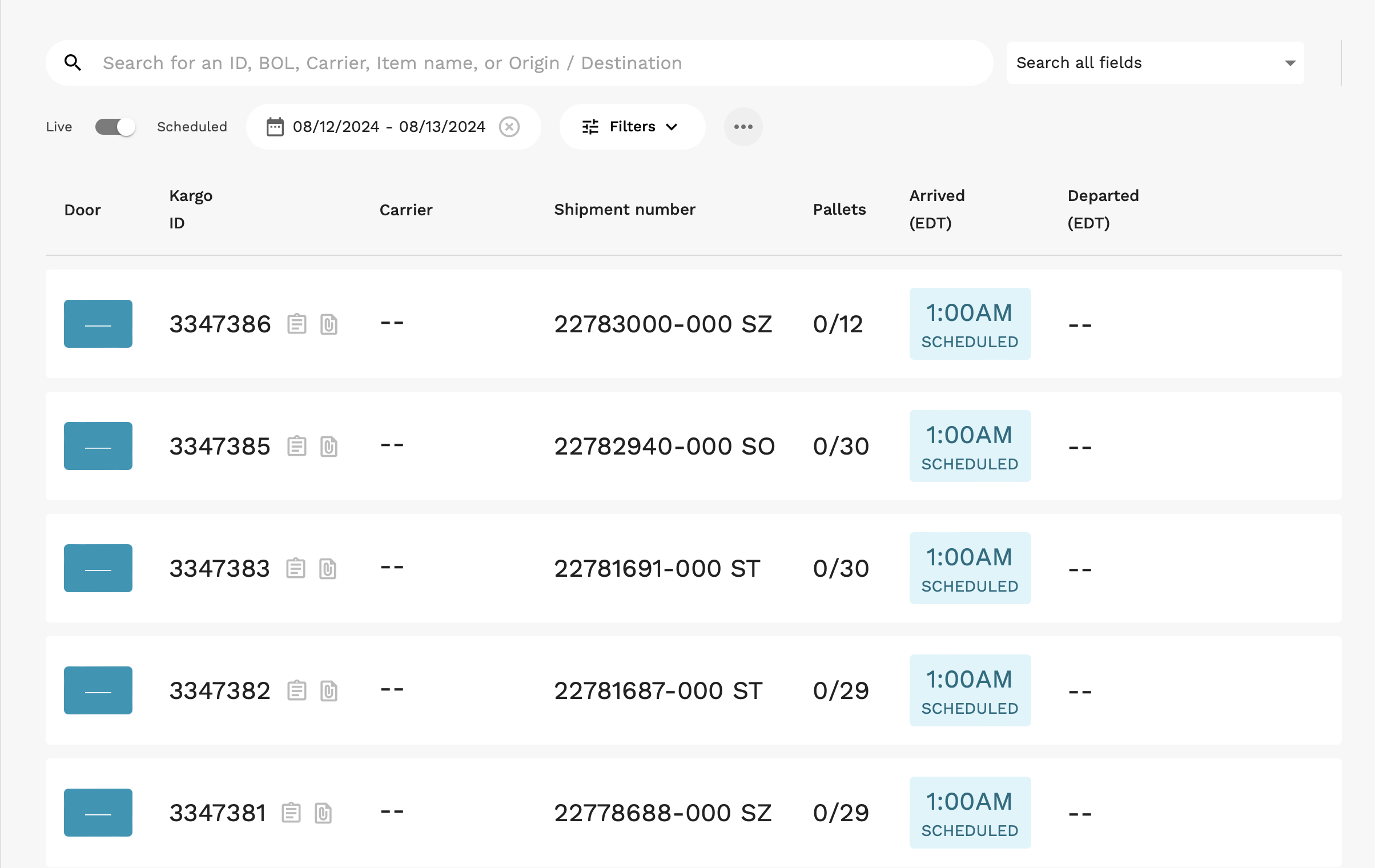
As the shipment passes through Kargo towers, our system will validate the content against the order information.
Email
Email Kargo a shipment report as an attachment from a company email address. The sender email addresses and filename format need to be consistent. You can send the file manually, or automatically at any frequency that makes sense for your operations team.
SFTP
Kargo will provide a facility-specific username and server information for uploads.
AS2
Kargo can also exchange files via AS2. If you already run AS2 software (e.g. Cleo, mendelson, IBM Sterling, OpenAS2), use the connection profile below to configure a trading partner for Kargo.
Download our public certificateConnection profile
| Setting | Value |
|---|---|
| Endpoint URL | http://s-e6b8d16a14134ea39.server.transfer.us-west-1.amazonaws.com:5080/ |
Kargo AS2 ID (AS2-To) | KargoAS2 (case-sensitive) |
| Encryption | AES-256-CBC — messages must be encrypted with our public certificate |
| Signing | SHA-256 — messages must be signed |
| MDN (receipt) | Synchronous, signed with SHA-256 |
| Content transfer encoding | Binary — send the raw (DER) encrypted body. Base64-encoded bodies are rejected. |
| Our public certificate | Download — used both to encrypt messages to us and to verify our signatures |
| Certificate SHA-256 fingerprint | B2:DE:59:53:CC:6D:9D:38:92:12:8A:40:1B:90:5B:B7:DF:96:FD:B4:1A:61:F0:12:7D:3A:4F:6B:FE:DB:1F:9B |
Check the fingerprint of the certificate you downloaded before configuring it:
openssl x509 -in kargo_as2.crt -noout -fingerprint -sha256
Before you can send, provide Kargo with:
- Your AS2 ID (the
AS2-Fromvalue you will send with). - Your public certificate (PEM) used for signing.
We register these on our side as a trading-partner agreement. Until that is in place, messages will be rejected.
Troubleshooting MDN errors
If the MDN comes back with an error instead of processed, these are the two most common causes:
| MDN disposition | Cause |
|---|---|
processed/Error: decryption-failed | Usually the body was sent base64-encoded rather than binary, or it was encrypted with an out-of-date certificate. Confirm the fingerprint above, then re-send with binary transfer encoding. |
processed/Error: insufficient-message-security | The message was not signed, or it used the legacy application/x-pkcs7-mime content type. Use application/pkcs7-mime and sign with SHA-256. |
Guidelines
- Aim to keep the file in a consistent format, with all columns present.
- The minimum required fields are:
- Shipment Number (the shipment ID in your WMS)
- Appointment Date
- Order Number
- An identifier for each order item ( e.g., SKU or LPN)
- The column names and values can be whatever they are set as in your WMS
Example
Download