REST API
Kargo exposes a REST API for programmatic access to platform resources.
The full interactive API reference, including all available endpoints, request/response schemas, and the ability to try requests directly, is available via Swagger:
https://api.kargo.zone/v1/docs/
Document Intake Swagger UI Guide
This guide explains how to use Kargo Swagger UI to send requests to POST /documents. The endpoint can create or update shipments, orders, and order items.
1A. Open Terminal on macOS
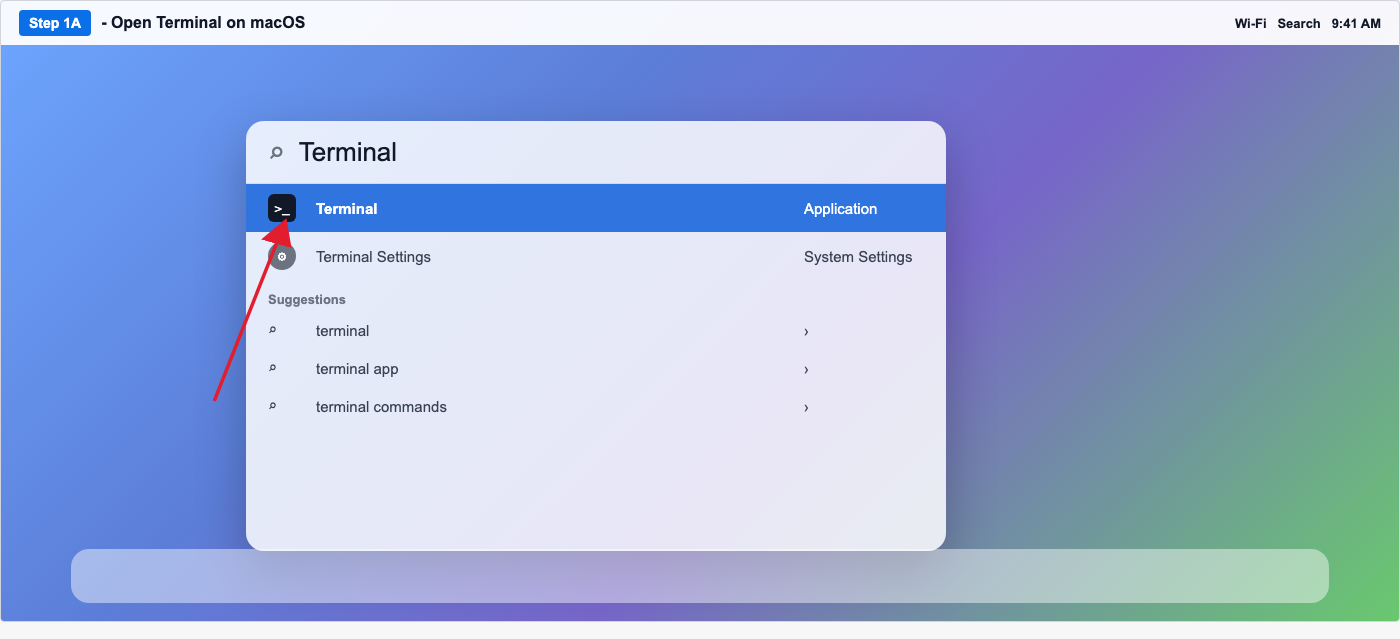
On macOS, press Command + Space to open Spotlight Search. Type Terminal, then click the Terminal application.
Run this command in Terminal. Replace <CLIENT_ID> and <CLIENT_SECRET> with the credentials provided by Kargo. Copy the returned access_token.
curl --request POST \
  --url https://mykargo.us.auth0.com/oauth/token \
  --header 'content-type: application/json' \
  --data '{
    "client_id": "<CLIENT_ID>",
    "client_secret": "<CLIENT_SECRET>",
    "audience": "https://api.kargo.zone/public_graphql",
    "grant_type": "client_credentials"
  }'
1B. Open Command Prompt on Windows
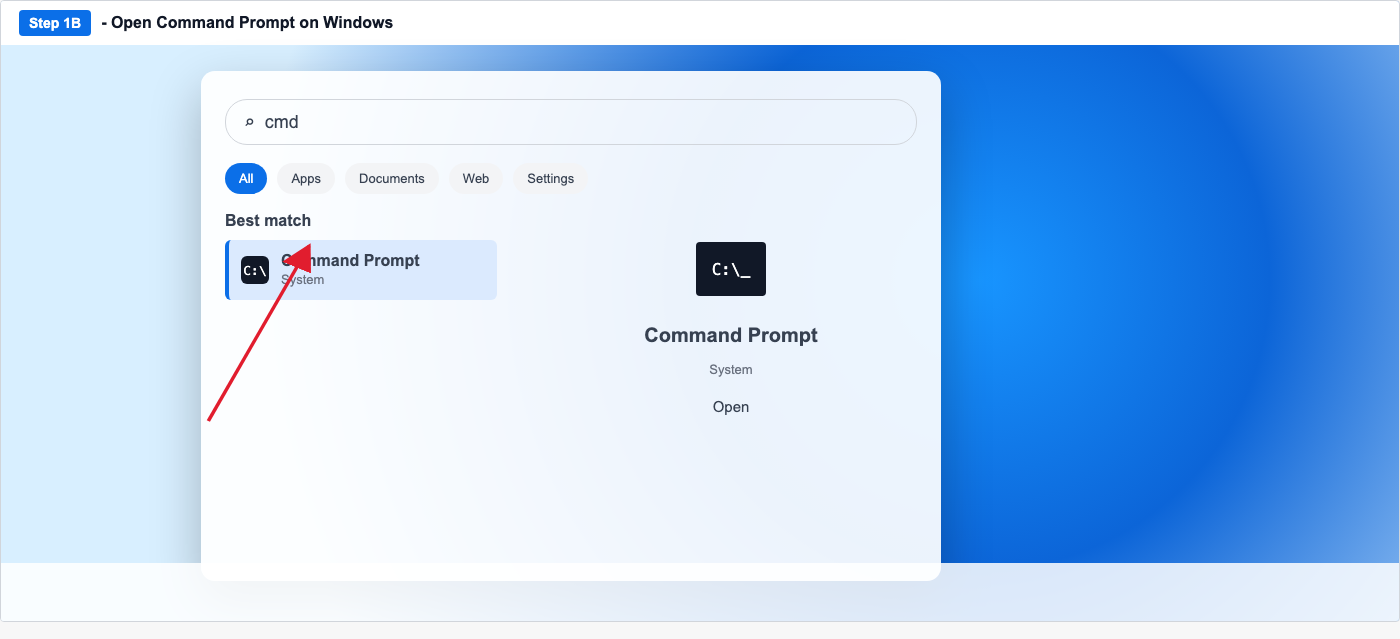
On Windows, open the Start menu, search for cmd or Command Prompt, then open the application.
Run this command in Command Prompt. Replace <CLIENT_ID> and <CLIENT_SECRET> with the credentials provided by Kargo. Copy the returned access_token.
curl.exe --request POST --url "https://mykargo.us.auth0.com/oauth/token" --header "content-type: application/json" --data "{\"client_id\":\"<CLIENT_ID>\",\"client_secret\":\"<CLIENT_SECRET>\",\"audience\":\"https://api.kargo.zone/public_graphql\",\"grant_type\":\"client_credentials\"}"
The response includes an access_token and token_type.
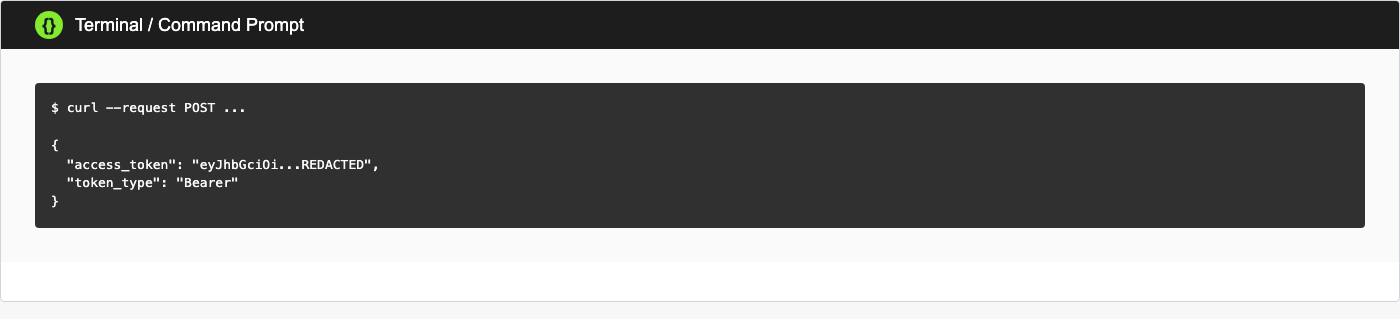
{
  "access_token": "eyJhbGciOi...REDACTED",
  "token_type": "Bearer"
}
2. Open Swagger UI and authorize
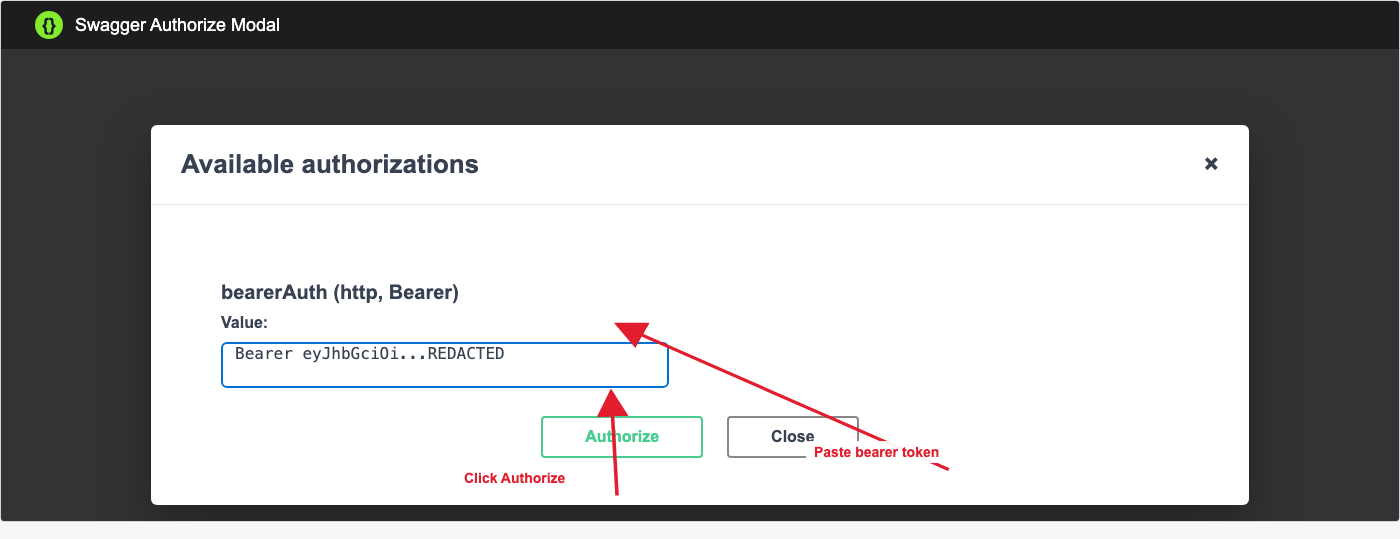
Open https://api.kargo.zone/v1/docs/. Click Authorize.
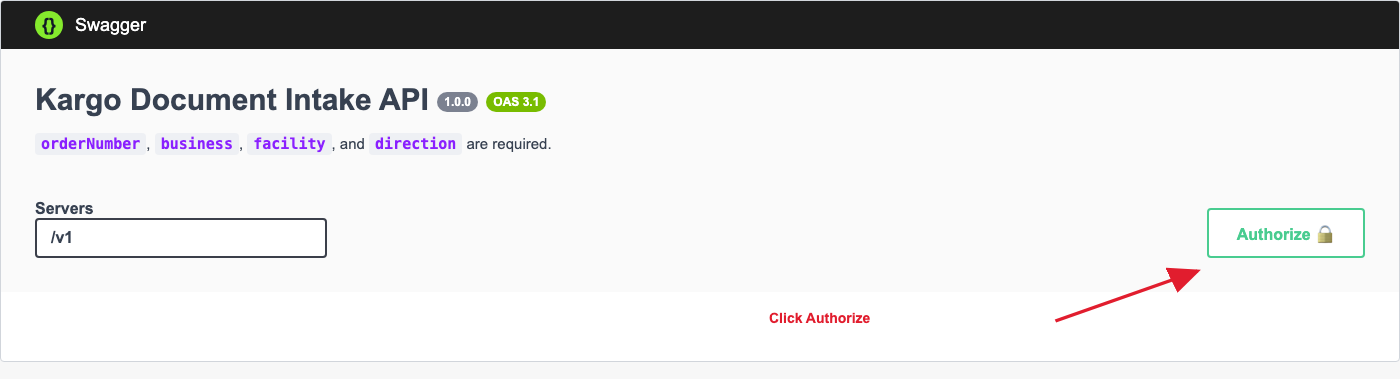
In the modal, paste the token value in this format:
Bearer <ACCESS_TOKEN>
Then click Authorize in the modal.
If the token is missing, expired, or invalid, the API returns 401 Unauthorized.
401 response if the token is missing, expired, or invalid
{
  "type": "about:blank",
  "title": "Unauthorized",
  "status": 401,
  "detail": "Missing or invalid bearer token."
}
Swagger sends the request without a usable bearer token, or the token is expired or invalid. Kargo rejects the request before processing the document body.
3. Open POST /documents and click Try it out
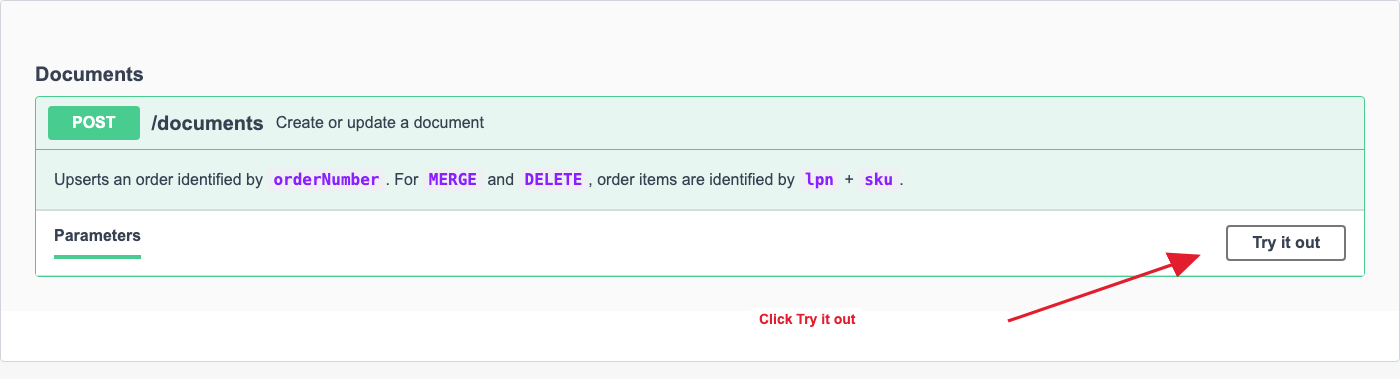
Scroll to the Documents section, expand POST /documents, then click Try it out.
4. Optional Correlation-Id
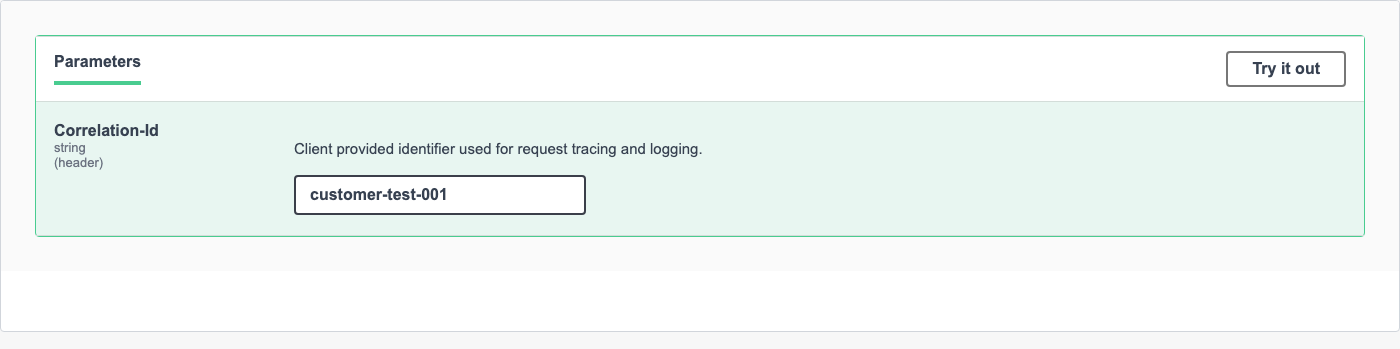
Correlation-Id is optional. It is useful for request tracing and log lookup. When supplied, Kargo returns the same value in the response.
5. Edit the request body and execute
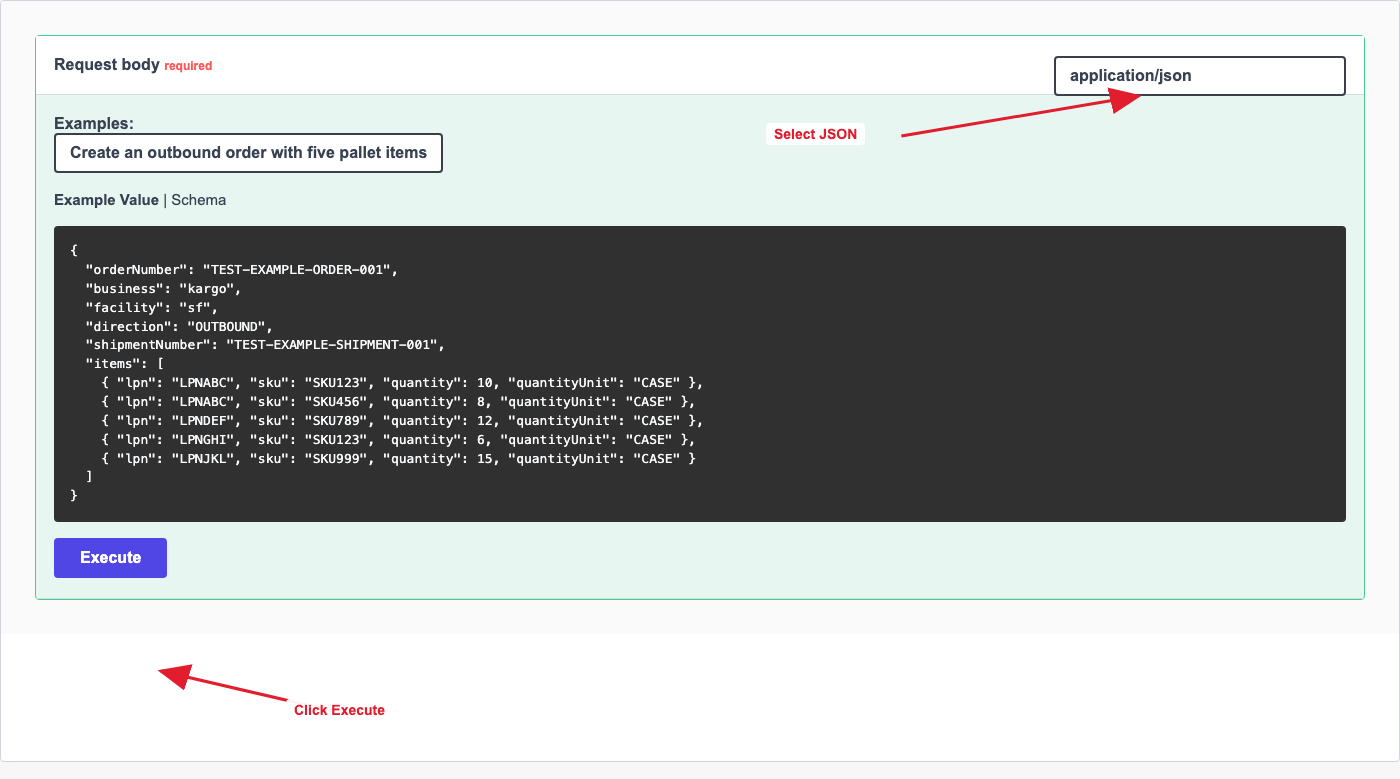
In Request body, choose application/json for JSON requests. XML is also supported by using application/xml or text/xml. Select an example from the Examples dropdown, edit the body, then click Execute.
6. Example 1: Create an outbound order with five pallet items
This creates or updates a shipment and order, and creates the requested pallet items. This example omits orderItemUpdateStrategy; when items are provided without a strategy, Kargo defaults to OVERWRITE.
Request
{
  "orderNumber": "TEST-EXAMPLE-ORDER-001",
  "business": "kargo",
  "facility": "sf",
  "direction": "OUTBOUND",
  "shipmentNumber": "TEST-EXAMPLE-SHIPMENT-001",
  "items": [
    {
      "lpn": "LPNABC",
      "sku": "SKU123",
      "quantity": 10,
      "quantityUnit": "CASE"
    },
    {
      "lpn": "LPNABC",
      "sku": "SKU456",
      "quantity": 8,
      "quantityUnit": "CASE"
    },
    {
      "lpn": "LPNDEF",
      "sku": "SKU789",
      "quantity": 12,
      "quantityUnit": "CASE"
    },
    {
      "lpn": "LPNGHI",
      "sku": "SKU123",
      "quantity": 6,
      "quantityUnit": "CASE"
    },
    {
      "lpn": "LPNJKL",
      "sku": "SKU999",
      "quantity": 15,
      "quantityUnit": "CASE"
    }
  ]
}
Expected response: 201 when one or more entities are created
{
  "created": [
    { "type": "SHIPMENT", "id": "6463000", "reference": "TEST-EXAMPLE-SHIPMENT-001" },
    { "type": "ORDER", "id": "1268000", "reference": "TEST-EXAMPLE-ORDER-001" },
    { "type": "ORDER_ITEM", "id": "3700001", "reference": "LPNABC" },
    { "type": "ORDER_ITEM", "id": "3700002", "reference": "LPNABC" },
    { "type": "ORDER_ITEM", "id": "3700003", "reference": "LPNDEF" },
    { "type": "ORDER_ITEM", "id": "3700004", "reference": "LPNGHI" },
    { "type": "ORDER_ITEM", "id": "3700005", "reference": "LPNJKL" }
  ],
  "updated": [],
  "removed": [],
  "shipment": {
    "id": 6463000,
    "status": "SCHEDULED",
    "orders": [
      {
        "orderNumber": "TEST-EXAMPLE-ORDER-001",
        "status": "CREATED",
        "items": [
          { "lpn": "LPNABC", "sku": "SKU123", "quantity": 10, "quantityUnit": "CASE", "id": "3700001" },
          { "lpn": "LPNABC", "sku": "SKU456", "quantity": 8, "quantityUnit": "CASE", "id": "3700002" },
          { "lpn": "LPNDEF", "sku": "SKU789", "quantity": 12, "quantityUnit": "CASE", "id": "3700003" },
          { "lpn": "LPNGHI", "sku": "SKU123", "quantity": 6, "quantityUnit": "CASE", "id": "3700004" },
          { "lpn": "LPNJKL", "sku": "SKU999", "quantity": 15, "quantityUnit": "CASE", "id": "3700005" }
        ]
      }
    ]
  }
}
How this response is generated: Kargo validates orderNumber, business, facility, and direction. business is the business slug and facility is the facility slug. It finds or creates the shipment using shipmentNumber, then finds or creates the order using orderNumber.
Item validation: because this request creates items through the default OVERWRITE strategy, every incoming item must include lpn, sku, quantity, and quantityUnit. If any required item field is missing, Kargo returns 422 Unprocessable Entity. Kargo also checks that the incoming request does not contain duplicate lpn + sku pairs.
Why this response is 201: the response includes new entities in created. In this example, Kargo created a shipment, an order, and order items.
How references are set: shipment references use shipmentNumber. If shipmentNumber is missing, the shipment reference uses orderNumber. Order references use orderNumber. Order item references use identifier when provided; otherwise they use lpn, then sku.
If shipmentNumber is missing: Kargo uses orderNumber as the shipment number. This is allowed, but it can make shipment tracking confusing.
If shipmentNumber is different from the order's current shipment: Kargo finds or creates the shipment for the new shipmentNumber. If the existing order is on another eligible shipment, the order may be remapped to the new shipment first, then OVERWRITE replaces the items on that remapped order. The old shipment is eligible only when it has not arrived and is not linked to another shipment.
If orderNumber is duplicated: Kargo chooses the most recently created eligible order with the same business, facility, direction, and order number.
Important for OVERWRITE: because no strategy is provided and items are present, this request behaves like OVERWRITE. Any existing item that is not included in the request is removed. Always send the complete desired item list.
Repeated request response: 201 with replaced items
{
  "created": [
    { "type": "ORDER_ITEM", "id": "3700006", "reference": "LPNABC" },
    { "type": "ORDER_ITEM", "id": "3700007", "reference": "LPNABC" },
    { "type": "ORDER_ITEM", "id": "3700008", "reference": "LPNDEF" },
    { "type": "ORDER_ITEM", "id": "3700009", "reference": "LPNGHI" },
    { "type": "ORDER_ITEM", "id": "3700010", "reference": "LPNJKL" }
  ],
  "updated": [
    { "type": "SHIPMENT", "id": "6463000", "reference": "TEST-EXAMPLE-SHIPMENT-001" },
    { "type": "ORDER", "id": "1268000", "reference": "TEST-EXAMPLE-ORDER-001" }
  ],
  "removed": [
    { "type": "ORDER_ITEM", "id": "3700001", "reference": "LPNABC" },
    { "type": "ORDER_ITEM", "id": "3700002", "reference": "LPNABC" },
    { "type": "ORDER_ITEM", "id": "3700003", "reference": "LPNDEF" },
    { "type": "ORDER_ITEM", "id": "3700004", "reference": "LPNGHI" },
    { "type": "ORDER_ITEM", "id": "3700005", "reference": "LPNJKL" }
  ],
  "shipment": {
    "id": 6463000,
    "orders": [
      {
        "orderNumber": "TEST-EXAMPLE-ORDER-001",
        "items": [
          { "lpn": "LPNABC", "sku": "SKU123", "id": "3700006" }
        ]
      }
    ]
  }
}
Why this repeated response is 201: the shipment and order already exist, so they appear in updated. The strategy is still OVERWRITE, so Kargo removes the old order item rows and creates new order item rows with the same item content. Because new order items were created, the response code is 201. The lpn, sku, quantity, and quantityUnit can look the same as the previous response, but the order item id values are different.
7. Example 2: Append an order item
APPEND adds incoming items and keeps existing order items.
Request
{
  "orderNumber": "TEST-EXAMPLE-ORDER-001",
  "business": "kargo",
  "facility": "sf",
  "direction": "OUTBOUND",
  "shipmentNumber": "TEST-EXAMPLE-SHIPMENT-001",
  "orderItemUpdateStrategy": "APPEND",
  "items": [
    {
      "lpn": "LPNNEW",
      "sku": "SKUAPPEND",
      "quantity": 1,
      "quantityUnit": "UNIT"
    }
  ]
}
Expected response: 201 when one or more entities are created
{
  "created": [
    { "type": "ORDER_ITEM", "id": "3700011", "reference": "LPNNEW" }
  ],
  "updated": [
    { "type": "SHIPMENT", "id": "6463000", "reference": "TEST-EXAMPLE-SHIPMENT-001" },
    { "type": "ORDER", "id": "1268000", "reference": "TEST-EXAMPLE-ORDER-001" }
  ],
  "removed": [],
  "shipment": {
    "id": 6463000,
    "orders": [
      {
        "orderNumber": "TEST-EXAMPLE-ORDER-001",
        "items": [
          { "lpn": "LPNNEW", "sku": "SKUAPPEND", "quantity": 1, "quantityUnit": "UNIT", "id": "3700011" }
        ]
      }
    ]
  }
}
How this response is generated: Kargo finds the matched shipment and order, then validates each incoming item. For APPEND, every incoming item must include lpn, sku, quantity, and quantityUnit. If any required item field is missing, Kargo returns 422 Unprocessable Entity. Kargo checks that the incoming request does not contain duplicate lpn + sku pairs, and that the matched order does not already have the same lpn + sku.
Why this response is 201: the shipment and order already exist, so they appear in updated. The new order item appears in created, so the response code is 201.
How references are set: shipment references use shipmentNumber. Order references use orderNumber. Order item references use identifier when provided; otherwise they use lpn, then sku.
If shipmentNumber is missing: Kargo uses orderNumber as the shipment number before finding the order.
If shipmentNumber is different from the order's current shipment: Kargo finds or creates the shipment for the new shipmentNumber. If the existing order is on another eligible shipment, the order may be remapped to the new shipment first, then APPEND adds the incoming item to that remapped order. The old shipment is eligible only when it has not arrived and is not linked to another shipment.
If orderNumber is duplicated: Kargo chooses the most recently created eligible order with the same business, facility, direction, and order number. APPEND is applied to that matched order.
Important for APPEND: APPEND is for creating new items only. If the same lpn + sku already exists on the matched order, Kargo returns 409 Conflict. Use MERGE to update an existing item, or OVERWRITE to replace the full item list.
Repeated APPEND response: 409 duplicate item key
{
  "type": "about:blank",
  "title": "Conflict",
  "status": 409,
  "detail": "DUPLICATE_ORDER_ITEM_KEY: lpn=LPNNEW, sku=SKUAPPEND"
}
Why this repeated response is 409: the item key LPNNEW + SKUAPPEND already exists on the order. APPEND only creates new items and does not update existing items, so Kargo rejects the request with 409 Conflict.
8. Example 3: Merge an order item by LPN + SKU
MERGE updates an existing item when the incoming lpn + sku matches an existing item. If no item matches, it creates a new item.
Request
{
  "orderNumber": "TEST-EXAMPLE-ORDER-001",
  "business": "kargo",
  "facility": "sf",
  "direction": "OUTBOUND",
  "shipmentNumber": "TEST-EXAMPLE-SHIPMENT-001",
  "orderItemUpdateStrategy": "MERGE",
  "items": [
    {
      "lpn": "LPNABC",
      "sku": "SKU123",
      "quantity": 5,
      "quantityUnit": "CASE"
    }
  ]
}
Expected response: 200 when existing entities are updated and nothing new is created
{
  "created": [],
  "updated": [
    { "type": "SHIPMENT", "id": "6463000", "reference": "TEST-EXAMPLE-SHIPMENT-001" },
    { "type": "ORDER", "id": "1268000", "reference": "TEST-EXAMPLE-ORDER-001" },
    { "type": "ORDER_ITEM", "id": "3700006", "reference": "LPNABC" }
  ],
  "removed": [],
  "shipment": {
    "id": 6463000,
    "orders": [
      {
        "orderNumber": "TEST-EXAMPLE-ORDER-001",
        "items": [
          { "lpn": "LPNABC", "sku": "SKU123", "quantity": 5, "quantityUnit": "CASE", "id": "3700006" }
        ]
      }
    ]
  }
}
How this response is generated: Kargo finds the matched shipment and order, then validates each incoming item. For MERGE, each incoming item must include lpn and sku. If either field is missing, Kargo returns 422 Unprocessable Entity. Kargo checks that the incoming request does not contain duplicate lpn + sku pairs, then builds a map of existing order items by lpn + sku.
Why this response is 200: Kargo finds LPNABC + SKU123 on the existing order and updates that item. The response has entities in updated, but created is empty, so nothing new was created and the response code is usually 200.
When no match exists: Kargo creates a new item and returns it in created. In that case, the response code can be 201. Include quantity and quantityUnit when the item might be created.
How references are set: shipment references use shipmentNumber. Order references use orderNumber. Order item references use identifier when provided; otherwise they use lpn, then sku.
If shipmentNumber is missing: Kargo uses orderNumber as the shipment number before finding the order.
If shipmentNumber is different from the order's current shipment: Kargo finds or creates the shipment for the new shipmentNumber. If the existing order is on another eligible shipment, the order may be remapped to the new shipment first, then MERGE updates or creates the item on that remapped order. The old shipment is eligible only when it has not arrived and is not linked to another shipment.
If orderNumber is duplicated: Kargo chooses the most recently created eligible order with the same business, facility, direction, and order number. MERGE is applied to that matched order.
Important for MERGE: MERGE uses lpn + sku to find an existing item. MERGE updates generally do not clear existing item values with empty strings or zero values. For example, if an item already has quantity: 5, sending quantity: 0 will not change it to zero.
Repeated MERGE response: 200
{
  "created": [],
  "updated": [
    { "type": "SHIPMENT", "id": "6463000", "reference": "TEST-EXAMPLE-SHIPMENT-001" },
    { "type": "ORDER", "id": "1268000", "reference": "TEST-EXAMPLE-ORDER-001" },
    { "type": "ORDER_ITEM", "id": "3700006", "reference": "LPNABC" }
  ],
  "removed": [],
  "shipment": {
    "id": 6463000,
    "orders": [
      {
        "orderNumber": "TEST-EXAMPLE-ORDER-001",
        "items": [
          { "lpn": "LPNABC", "sku": "SKU123", "quantity": 5, "quantityUnit": "CASE" }
        ]
      }
    ]
  }
}
Why this repeated response is 200: the same existing item is found again by lpn + sku. Kargo updates it again, but does not create or remove an order item, so created and removed are empty and the response code is usually 200.
9. Example 4: Delete an order item by LPN + SKU
DELETE removes existing order items that match the requested lpn + sku.
Request
{
  "orderNumber": "TEST-EXAMPLE-ORDER-001",
  "business": "kargo",
  "facility": "sf",
  "direction": "OUTBOUND",
  "shipmentNumber": "TEST-EXAMPLE-SHIPMENT-001",
  "orderItemUpdateStrategy": "DELETE",
  "items": [
    {
      "lpn": "LPNABC",
      "sku": "SKU123"
    }
  ]
}
Expected response: 200 when existing entities are updated or removed and nothing new is created
{
  "created": [],
  "updated": [
    { "type": "SHIPMENT", "id": "6463000", "reference": "TEST-EXAMPLE-SHIPMENT-001" },
    { "type": "ORDER", "id": "1268000", "reference": "TEST-EXAMPLE-ORDER-001" }
  ],
  "removed": [
    { "type": "ORDER_ITEM", "id": "3700006", "reference": "LPNABC" }
  ],
  "shipment": {
    "id": 6463000,
    "orders": [
      { "orderNumber": "TEST-EXAMPLE-ORDER-001", "items": [] }
    ]
  }
}
How this response is generated: Kargo finds the matched shipment and order, then validates each incoming item. For DELETE, each incoming item must include lpn and sku. If either field is missing, Kargo returns 422 Unprocessable Entity. Kargo checks that the incoming request does not contain duplicate lpn + sku pairs, then finds existing order items by lpn + sku.
Why this response is 200: Kargo removes the matching order item and returns it in removed. Since no new entity was created and created is empty, the response code is usually 200.
When no match exists: the request can still succeed, but removed will be empty.
How references are set: shipment references use shipmentNumber. Order references use orderNumber. Order item references use identifier when provided; otherwise they use lpn, then sku.
If shipmentNumber is missing: Kargo uses orderNumber as the shipment number before finding the order.
If shipmentNumber is different from the order's current shipment: Kargo finds or creates the shipment for the new shipmentNumber. If the existing order is on another eligible shipment, the order may be remapped to the new shipment first, then DELETE removes the matching item from that remapped order. The old shipment is eligible only when it has not arrived and is not linked to another shipment.
If orderNumber is duplicated: Kargo chooses the most recently created eligible order with the same business, facility, direction, and order number. DELETE is applied to that matched order.
Important for DELETE: DELETE only needs the item key fields, lpn and sku. Quantity fields are not required because they are not used to identify the item.
Repeated DELETE response: 200 with nothing removed
{
  "created": [],
  "updated": [
    { "type": "SHIPMENT", "id": "6463000", "reference": "TEST-EXAMPLE-SHIPMENT-001" },
    { "type": "ORDER", "id": "1268000", "reference": "TEST-EXAMPLE-ORDER-001" }
  ],
  "removed": [],
  "shipment": {
    "id": 6463000,
    "orders": [
      { "orderNumber": "TEST-EXAMPLE-ORDER-001", "items": [] }
    ]
  }
}
Why this repeated response is 200: the matching item was already deleted by the previous request. Kargo finds the shipment and order, but finds no matching item to remove. Nothing new is created, so the response is usually 200 with an empty removed array.
10. Example 5: Replace all order items
OVERWRITE removes all existing order items from the matched order, then creates the incoming items.
Request
{
  "orderNumber": "TEST-EXAMPLE-ORDER-001",
  "business": "kargo",
  "facility": "sf",
  "direction": "OUTBOUND",
  "shipmentNumber": "TEST-EXAMPLE-SHIPMENT-001",
  "orderItemUpdateStrategy": "OVERWRITE",
  "items": [
    {
      "lpn": "LPNREPLACE001",
      "sku": "SKUREPLACE001",
      "quantity": 2,
      "quantityUnit": "UNIT"
    },
    {
      "lpn": "LPNREPLACE002",
      "sku": "SKUREPLACE002",
      "quantity": 3,
      "quantityUnit": "CASE"
    }
  ]
}
Expected response: 201 when one or more entities are created
{
  "created": [
    { "type": "ORDER_ITEM", "id": "3700012", "reference": "LPNREPLACE001" },
    { "type": "ORDER_ITEM", "id": "3700013", "reference": "LPNREPLACE002" }
  ],
  "updated": [
    { "type": "SHIPMENT", "id": "6463000", "reference": "TEST-EXAMPLE-SHIPMENT-001" },
    { "type": "ORDER", "id": "1268000", "reference": "TEST-EXAMPLE-ORDER-001" }
  ],
  "removed": [
    { "type": "ORDER_ITEM", "id": "3700011", "reference": "LPNNEW" }
  ],
  "shipment": {
    "id": 6463000,
    "orders": [
      {
        "orderNumber": "TEST-EXAMPLE-ORDER-001",
        "items": [
          { "lpn": "LPNREPLACE001", "sku": "SKUREPLACE001", "quantity": 2, "quantityUnit": "UNIT" },
          { "lpn": "LPNREPLACE002", "sku": "SKUREPLACE002", "quantity": 3, "quantityUnit": "CASE" }
        ]
      }
    ]
  }
}
How this response is generated: Kargo finds the matched shipment and order, then validates each incoming item. For OVERWRITE, every incoming item must include lpn, sku, quantity, and quantityUnit. If any required item field is missing, Kargo returns 422 Unprocessable Entity. Kargo also checks that the incoming request does not contain duplicate lpn + sku pairs.
Item behavior: all existing order items on the matched order are deleted and returned in removed. Then each incoming item is created and returned in created.
Why this response is 201: the response includes new order items in created. Because one or more entities were created, the response code is 201.
How references are set: shipment references use shipmentNumber. Order references use orderNumber. Order item references use identifier when provided; otherwise they use lpn, then sku.
If shipmentNumber is missing: Kargo uses orderNumber as the shipment number before finding the order.
If shipmentNumber is different from the order's current shipment: Kargo finds or creates the shipment for the new shipmentNumber. If the existing order is on another eligible shipment, the order may be remapped to the new shipment first, then OVERWRITE replaces all items on that remapped order. The old shipment is eligible only when it has not arrived and is not linked to another shipment.
If orderNumber is duplicated: Kargo chooses the most recently created eligible order with the same business, facility, direction, and order number. OVERWRITE is applied to that matched order.
Important for OVERWRITE: OVERWRITE replaces the full item list on the matched order. Any existing item that is not included in the request is removed. Always send the complete desired item list.
Repeated OVERWRITE response: 201
{
  "created": [
    { "type": "ORDER_ITEM", "id": "3700014", "reference": "LPNREPLACE001" },
    { "type": "ORDER_ITEM", "id": "3700015", "reference": "LPNREPLACE002" }
  ],
  "updated": [
    { "type": "SHIPMENT", "id": "6463000", "reference": "TEST-EXAMPLE-SHIPMENT-001" },
    { "type": "ORDER", "id": "1268000", "reference": "TEST-EXAMPLE-ORDER-001" }
  ],
  "removed": [
    { "type": "ORDER_ITEM", "id": "3700012", "reference": "LPNREPLACE001" },
    { "type": "ORDER_ITEM", "id": "3700013", "reference": "LPNREPLACE002" }
  ],
  "shipment": {
    "id": 6463000,
    "orders": [
      {
        "orderNumber": "TEST-EXAMPLE-ORDER-001",
        "items": [
          { "lpn": "LPNREPLACE001", "sku": "SKUREPLACE001", "id": "3700014" },
          { "lpn": "LPNREPLACE002", "sku": "SKUREPLACE002", "id": "3700015" }
        ]
      }
    ]
  }
}
Why this repeated response is 201: OVERWRITE always replaces the current item list with newly created incoming items. The previous replacement items are returned in removed, and the new replacement items are returned in created. Because new items were created, the response code is usually 201.
11. Where to see supported fields in Swagger UI
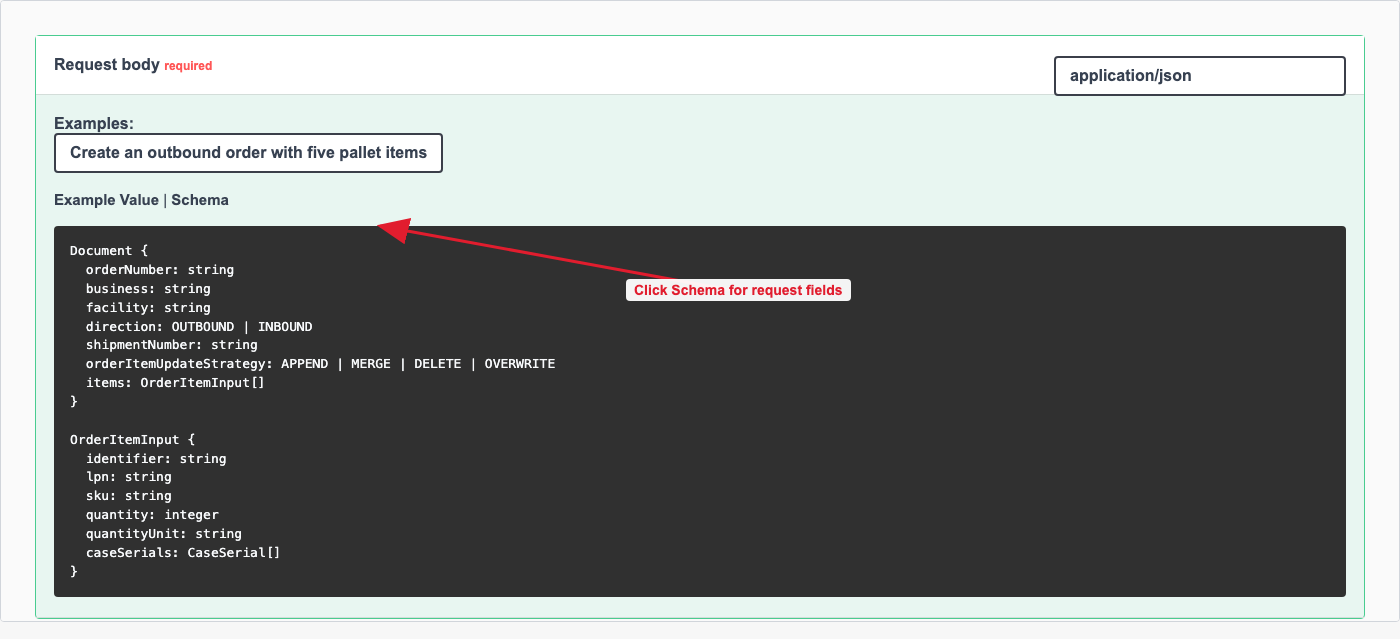
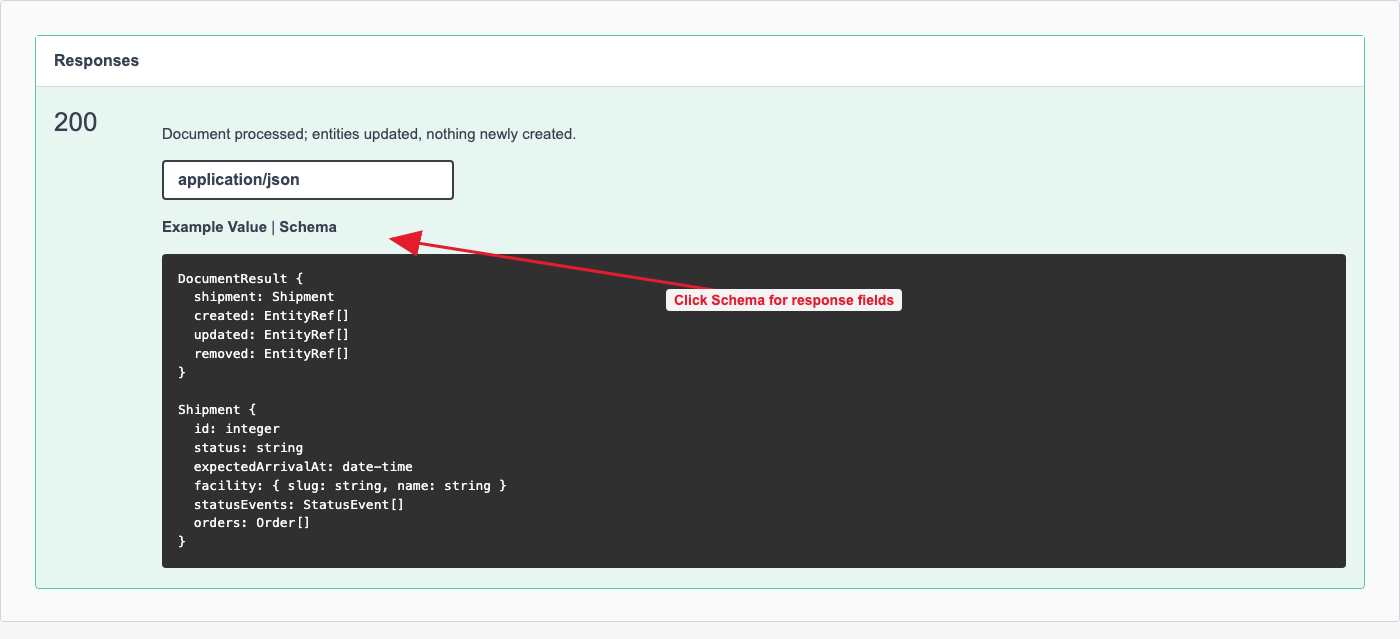
Swagger UI shows supported request and response fields in two places:
- In Request body, click the Schema tab to see all request fields that can be sent.
- In Responses, click the Schema tab under response code 200 or 201 to see fields returned by the API.
| Group | Fields supported by KEP processing | Important behavior |
|---|---|---|
| Required | orderNumber, business, facility, direction | business is the business slug. facility is the facility slug. |
| Shipment-level | shipmentNumber, expectedArrivalAt, trailerNumber, dockSlug, driverName, driverLicenseNumber, driverLicensePlate, additionalFields, carrier | shipmentNumber is used as the shipment number. If omitted, Kargo uses orderNumber as the shipment number. dockSlug resolves to a dock id. Driver fields and additionalFields are stored in shipment additional fields. |
| Order-level | orderType, purchaseOrder, consigneeName, consigneePhoneNumber, bolNumber, expectedQuantity, carrier, sealNumber, supplier, client, destination | These update the matched order on any request when provided. Empty strings generally do not clear existing values, and expectedQuantity: 0 does not clear or overwrite an existing quantity. |
| Order item-level | identifier, lpn, sku, quantity, quantityUnit, purchaseOrder, description, upc, weightPerUnit, weightUnit, height, length, dimensionUnit, isDangerousGood, lot, expirationDate, manufacturingDate, caseSerials | MERGE and DELETE match items by lpn + sku. identifier is optional and is not used for matching. |
12. Required item fields by strategy
| Strategy | Required item fields | Behavior |
|---|---|---|
APPEND | lpn, sku, quantity, quantityUnit | Adds new items. Missing required fields return 422. Duplicate lpn + sku pairs return 409. |
MERGE | lpn, sku | Updates existing items matched by lpn + sku; creates non-matching items. Missing key fields return 422. |
DELETE | lpn, sku | Deletes existing items matched by lpn + sku. Missing key fields return 422. |
OVERWRITE | lpn, sku, quantity, quantityUnit | Deletes all existing items on the matched order, then creates the incoming items. Missing required fields return 422. |
13. Response code summary
| Code | Meaning |
|---|---|
| 200 | Document processed; existing entities were updated or removed and nothing new was created. |
| 201 | Document processed; one or more entities were created. |
| 400 | Malformed JSON/XML or wrong field types. |
| 401 | Missing, expired, or invalid bearer token. |
| 403 | Token lacks permission for the requested business or facility. |
| 404 | business or facility not found. |
| 409 | Conflict, such as duplicate lpn + sku pairs, APPEND creating a duplicate item key, or a shipment conflict. |
| 415 | Unsupported media type. Use application/json, application/xml, or text/xml. |
| 422 | Semantically invalid document, such as a bad enum value or missing fields required by the chosen item strategy. |
14. Important warnings
Use the correct business and facility. This guide uses business: "kargo" and facility: "sf". These values are slugs. Use the business and facility slugs your token is allowed to access.
Missing shipmentNumber. If shipmentNumber is not provided, Kargo uses orderNumber as the shipment number. This is allowed, but it can make shipment tracking confusing.
Order remapping. If the request points to a different shipment number and the existing order is on another eligible shipment, the order may be remapped to the new shipment. The old shipment is eligible only when it has not arrived and is not linked to another shipment.
Duplicate orderNumber. If multiple eligible orders have the same business, facility, direction, and order number, the API chooses the most recently created eligible order. This is deterministic, but it may not be the order the customer intended to update, delete from, append to, or overwrite.
Item uniqueness. Kargo identifies document API order items by lpn + sku for MERGE and DELETE. Keep this pair unique within the matched order.
APPEND duplicate protection. APPEND rejects duplicate lpn + sku pairs with 409 Conflict. Use MERGE to update existing items, or OVERWRITE to replace the full item list.
Required item fields. APPEND and OVERWRITE require lpn, sku, quantity, and quantityUnit. MERGE and DELETE require lpn and sku. Missing required fields return 422 Unprocessable Entity.
MERGE does not clear with empty/zero values. During MERGE updates, sending quantity: 0 will not change an existing quantity to zero, and sending an empty string such as sku: "" will not clear the existing value.
Empty items. If items is omitted or empty, existing order items are unchanged.
Default strategy. If items are provided and orderItemUpdateStrategy is omitted, the API defaults to OVERWRITE.
Default shipment timing. If expectedArrivalAt is omitted, Kargo sets the shipment expected arrival time to the current UTC time when the request is processed. New scheduled shipments also get their scheduled time from the current UTC time.
Status event times. In the response, the SCHEDULED status event is completed using the scheduled shipment time. ARRIVED and DEPARTED are marked incomplete and return an empty completed time until the shipment actually arrives or departs.
Empty response defaults. Some response fields use safe defaults when no value exists: strings return as empty strings, numeric item fields return as 0, and boolean item fields return as false. For example, missing item dimensions or weights can appear as 0 in the response.
Response references. In created, updated, and removed, shipment references use the shipment number, order references use orderNumber, and order item references use identifier when provided, otherwise lpn, otherwise sku.
Authentication
All REST API requests require a bearer token. See the Authentication documentation for details on how to obtain one.